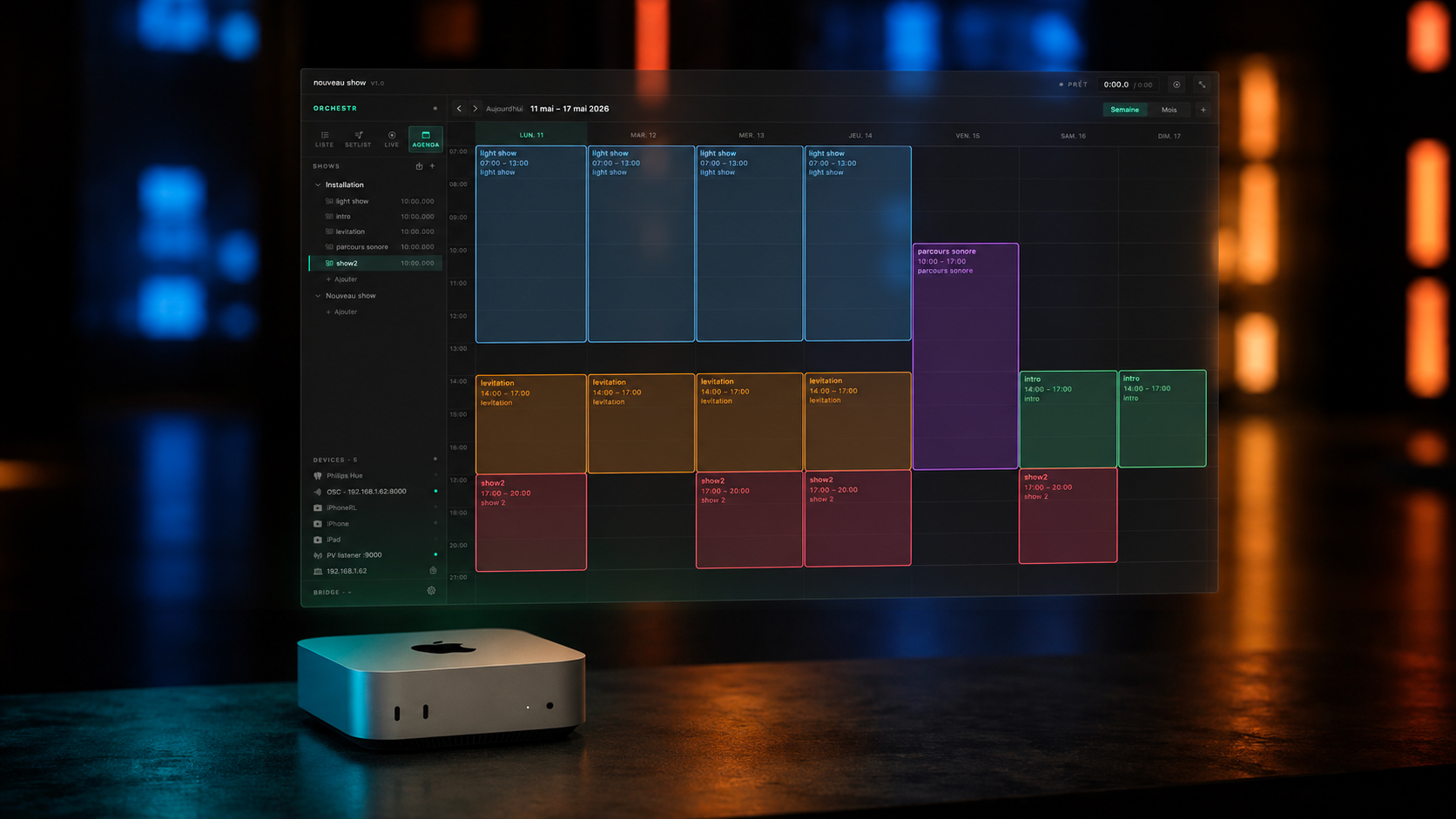
Orchestr can also
run without you.
Program it once. It handles the rest — day after day, week after week.
Museums · Galleries · Storefronts · Long-running events
Mac only · Add-on · €249 launch price
— THE PRINCIPLE
Your artist creates.
You broadcast.
Installation Mode is built on a clear separation of roles between the person who creates and the person who runs the show.
A creator — artist, agency, or creative technologist — designs the show using their Orchestr Mac or iPad license. They control every sequence, every transition, every intensity level. Once the show is finalized, they export the project and deliver it to you as a turnkey package.
On your end, you install Orchestr on a Mac and activate Installation Mode. You set the schedule — which days, which hours, any variations depending on the time of week. Then you set down the Mac and move on. Orchestr handles the rest.
Designs the show using their Mac or iPad license
Exports the project and delivers it as a turnkey package
Installs and activates Installation Mode. Orchestr handles the rest.
— PROGRAMMING
By time of day.
By day of the week.
Define exactly when your installation starts — and when it stops.
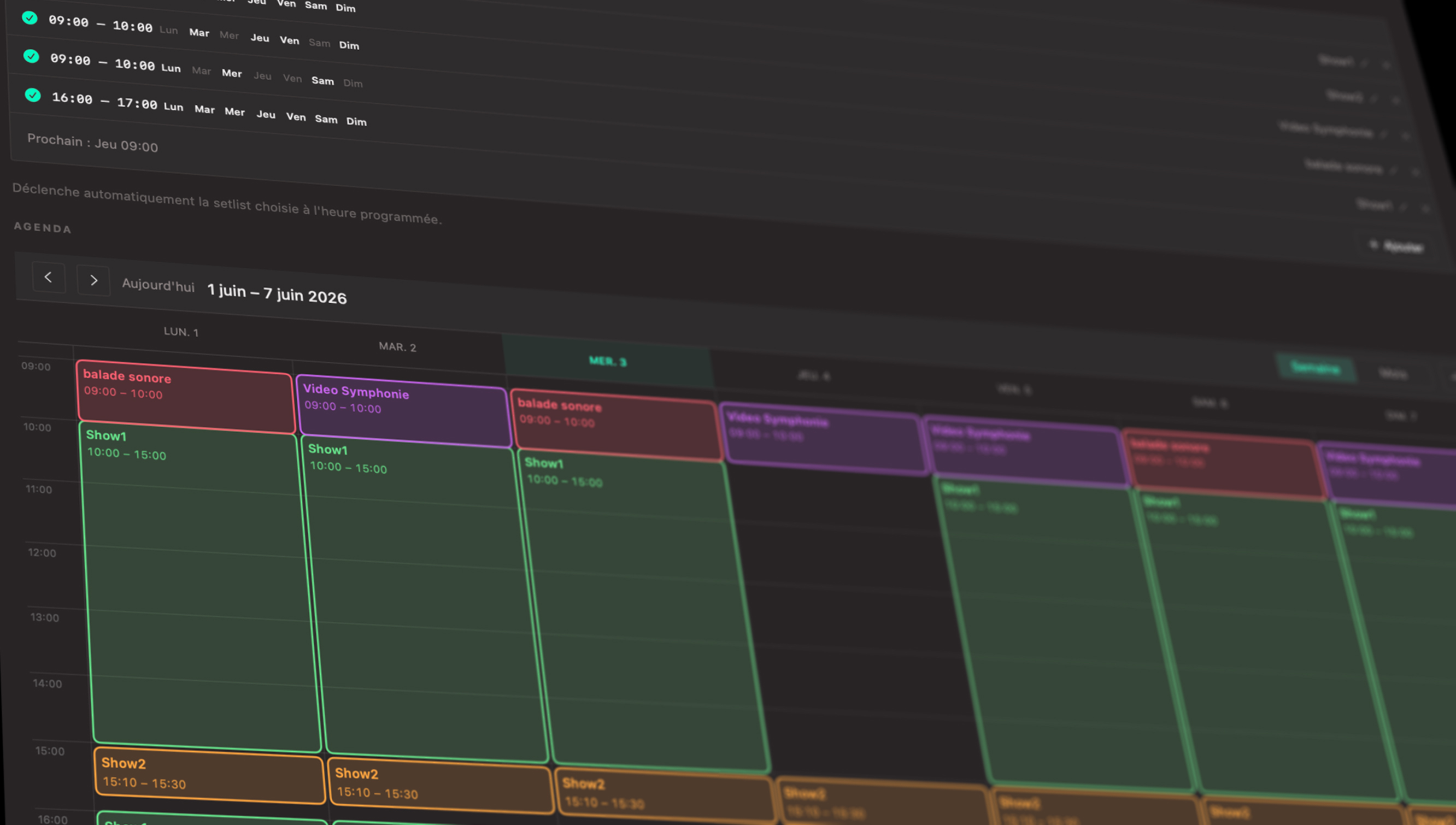
Monday to Sunday · 10:00 → 18:30 · Automatic pause on Tuesdays
Monday to Saturday · 09:00 → 21:00 · Special sequence on Friday evenings
June 15–22 · 18:00 → 23:00 · Progressive intensity over the course of the evening
Opening night Thursday 19:00→22:00 · Exhibition Fri–Sun 10:00→19:00
Each time slot can trigger a different sequence — the morning show doesn't have to be the evening show.
— READ-ONLY PROTECTION
Your content is protected.
Installation Mode opens the project as read-only. The space running the installation sees the show — not the creation interface. No access to the editor. No risk of accidental changes.
The artistic content remains exactly as the creator designed it. Neither the museum manager nor the store manager can touch the sequence, the lighting, or the sound. They see what was delivered — and nothing else.
— FOR CREATORS
Do you deliver installations?
Orchestr is built for your workflow.
You create using your standard Orchestr Mac or iPad license — the same one you use during rehearsals, residencies, or live shows. No special creator license, no proprietary export format to wrestle with. Your show, in a file, ready to deliver.
Your client receives the project. They install Orchestr Mac, activate Installation Mode, and configure the schedule to fit their needs. That's it. The show runs — exactly as you designed it, with no one able to change a thing.
If you need to update the content six months down the line, you create and export a new project. Your client replaces the file. No complex technical intervention required.
Your job ends at delivery. No maintenance. No daily startup support. Orchestr takes care of it.
You're a creator and you don't have Orchestr Mac yet? See all configurations →
— PROTOCOLS
Everything it controls in a show — without you.
DMX · Open DMX · Art-Net · sACN · Philips Hue · Lighttoys · Orchestr Light
8-channel audio · Loop playback · Automatic fade · Synchronized to sequences
Fullscreen playback · Automatic loop · External display output
OSC · MIDI · ESP32 / OrchestrBox · Control any compatible device
An installation can simultaneously control lighting, audio, video, and effects — everything that works in an Orchestr show can work in an installation.
— COMPARISON
Against the alternatives.
| Medialon Manager | Alcorn McBride | Orchestr Installation | |
|---|---|---|---|
| Price | €8,000+ on quote | €5,000+ hardware | €249 + Mac (€349) |
| Setup | AV integrator required | AV integrator required | Self-sufficient |
| Programming | Technically complex | Technically complex | Visual calendar |
| Platform | PC | Dedicated hardware | Mac |
| Updates | Contract-based | Contract-based | 12 months included |
Orchestr Installation is designed for human-scale installations — museums, galleries, shops, events. It is not intended to replace Medialon or Alcorn McBride in theme parks or complex industrial setups. For everything else, it's the best option out there.
— WHO IS IT FOR
Made for you.
Schedule the experience around your opening hours. The show starts on its own, stops on its own, and respects your closing days.
Opening night, regular exhibition, late evenings — each moment can have its own sequence. No intervention required between time slots.
A calendar-driven lighting and audio sequence. Monday through Saturday, with a special version on Friday evenings.
Festivals, touring exhibitions, temporary installations. Deploy once, configure once, let it run.
Deliver a turnkey experience to your clients. Your content, protected and autonomous, runs without your daily presence.
Your creative workflow stays intact. The add-on integrates with your existing license — no new tool to learn.
— REQUIREMENTS
Three things.
The add-on that enables automatic scheduling. €249 — one-time purchase. Requires Orchestr Mac.
The recommended hardware. Compact, silent, reliable. Built to run 24/7. Not supplied by Orchestr.
Total for a complete installation: Orchestr Mac €349 + Installation Mode €249 = €598 — one-time purchase, no subscription.
Compared to Medialon at €8,000+ on quote — the same autonomy, at a fraction of the price.
— FAQ
Your questions.
Does the creator need to be present for the initial setup?
No. Once you have received the exported project, setup takes just a few minutes. The included documentation is all you need — set your schedule, activate Installation Mode, and you're done. No advanced technical skills are required for installation and startup.
What happens if the Mac restarts?
Orchestr launches automatically when the Mac starts up. Combined with macOS's built-in auto-login (configurable in System Settings), your installation resumes exactly where it should after a power outage or scheduled restart — no intervention needed.
Can the content be modified after delivery?
No. Installation Mode opens the project as read-only — neither the venue nor anyone else can modify the sequences, lighting, or sound. If an update is needed, the creator produces a new exported project and sends it to you. You replace the file. That is the only way to change the content.
How many sequences can be programmed in the calendar?
There is no fixed limit. You can define multiple time slots per day, different hours for different days of the week, and special periods (opening nights, late evenings, exceptional closures). Each slot can trigger a different sequence from the show — the system is designed to handle complex schedules without any technical configuration.
Does Installation Mode work with Orchestr Light?
Yes. If your show includes lighting scenes created with Orchestr Light — DMX, Philips Hue, Lighttoys — Installation Mode controls them automatically according to the schedule, just like the rest of the show. No additional configuration required: everything that's part of the show runs in the installation.
Your installation deserves to run without you.
That's exactly what Orchestr does.
Are you a creator looking for a tool to deliver your installations?